Tabs
-
Notification
-

Dmitriy Groshev
Hi, i am josephin. How are you...
17:123 -

Sufiya Elija
I need job, Please help me.
Fri32 -

Janis Evans
Good Morning!
8:2212 -

Mukrani Pabelo
Hi, i am josephin. How are you...
03:1410 -
Josephin Water
You’ve got some kind of a stom...
Thu2 -
Janis Evans
Good Morning!
8:2212 -
Sufiya Elija
I need job, Please help me.
Fri32
-
-
-
-
Cart Items(25)
-

Flower Pot
$25.00
-

Iphone Max pro
$35.20
-

Royal Party Glass
$45.10
-

Water Proof Watch
$12.30
-

Traveling Duffle Bag
$32.10
Proceed to CheckoutBag Total
$250.00 -
-
-
 English
  French
-
 Spanich
 -
 Arabic
-
-
Helen Walter
Admin
- General
- Components
- Applications
- Forms & Table
- Pages
- Miscellaneous
Tabs
Set tabs using .tabs class.

Angela R. Lear
239-664-7751
Marjorie W. Martin
440-494-0729
Russell P. Renfrew
718-740-8438
Kevin A. Ek
218-793-6609
Carolyn A. Sutton
314-445-1451
Emily T. Hooper
258-664-7751
Ann J. Strickland
440-851-0729
Natasha W. Watson
698-740-8438
Thomas A. Leroy
218-793-7845
Mark S. Ward
314-4874-1451<div class="flex flex-wrap items-center gap-4">
<div class="flex items-center gap-2">
<div class="avatar">
<div class="w-10 h-10 rounded-full xl:w-9">
<img src="../../assets/images/avatar/25.jpg" alt="avatar"/></div>
</div>
<div class="flex flex-col gap-1">
<h3 class="text-xs font-bold leading-none lg:text-2xs dark:text-white">Angela R. Lear</h3>
<span class="text-content text-3xs">239-664-7751</span>
</div>
</div>
<div class="flex items-center gap-2">
<div class="avatar">
<div class="w-10 h-10 rounded-full xl:w-9"> <img src="../../assets/images/avatar/15.jpg" alt="avatar"/></div>
</div>
<div class="flex flex-col gap-1">
<h3 class="text-xs font-bold leading-none lg:text-2xs dark:text-white"> Marjorie W. Martin</h3>
<span class="text-content text-3xs">440-494-0729</span>
</div>
</div>
<div class="flex items-center gap-2">
<div class="avatar">
<div class="w-10 h-10 rounded-full xl:w-9"> <img src="../../assets/images/avatar/6.jpg" alt="avatar"/></div>
</div>
<div class="flex flex-col gap-1">
<h3 class="text-xs font-bold leading-none lg:text-2xs dark:text-white">Russell P. Renfrew</h3>
<span class="text-content text-3xs">718-740-8438</span>
</div>
</div>
<div class="flex items-center gap-2">
<div class="avatar">
<div class="w-10 h-10 rounded-full xl:w-9"> <img src="../../assets/images/avatar/27.jpg" alt="avatar"/></div>
</div>
<div class="flex flex-col gap-1">
<h3 class="text-xs font-bold leading-none lg:text-2xs dark:text-white">Kevin A. Ek</h3>
<span class="text-content text-3xs">218-793-6609</span>
</div>
</div>
<div class="flex items-center gap-2">
<div class="avatar">
<div class="w-10 h-10 rounded-full xl:w-9"> <img src="../../assets/images/avatar/27.jpg" alt="avatar"/></div>
</div>
<div class="flex flex-col gap-1">
<h3 class="text-xs font-bold leading-none lg:text-2xs dark:text-white">Kevin A. Ek</h3>
<span class="text-content text-3xs">218-793-6609</span>
</div>
</div>
<div class="flex items-center gap-2">
<div class="avatar">
<div class="w-10 h-10 rounded-full xl:w-9"> <img src="../../assets/images/avatar/26.jpg" alt="avatar"/></div>
</div>
<div class="flex flex-col gap-1">
<h3 class="text-xs font-bold leading-none lg:text-2xs dark:text-white">Carolyn A. Sutton</h3>
<span class="text-content text-3xs">314-445-1451</span>
</div>
</div>
<div class="flex flex-wrap items-center gap-4">
<div class="flex items-center gap-2">
<div class="avatar">
<div class="w-10 h-10 rounded-full xl:w-9"> <img src="../../assets/images/avatar/31.jpg" alt="avatar"/></div>
</div>
<div class="flex flex-col gap-1">
<h3 class="text-xs font-bold leading-none lg:text-2xs dark:text-white">Emily T. Hooper</h3>
<span class="text-content text-3xs">258-664-7751 </span>
</div>
</div>
</div>
<div class="flex items-center gap-2">
<div class="avatar">
<div class="w-10 h-10 rounded-full xl:w-9"> <img src="../../assets/images/avatar/34.jpg" alt="avatar"/></div>
</div>
<div class="flex flex-col gap-1">
<h3 class="text-xs font-bold leading-none lg:text-2xs dark:text-white"> Ann J. Strickland</h3>
<span class="text-content text-3xs">440-851-0729</span>
</div>
</div>
<div class="flex items-center gap-2">
<div class="avatar">
<div class="w-10 h-10 rounded-full xl:w-9"> <img src="../../assets/images/avatar/22.jpg" alt="avatar"/></div>
</div>
<div class="flex flex-col gap-1">
<h3 class="text-xs font-bold leading-none lg:text-2xs dark:text-white">Natasha W. Watson</h3>
<span class="text-content text-3xs">698-740-8438</span>
</div>
</div>
<div class="flex items-center gap-2">
<div class="avatar">
<div class="w-10 h-10 rounded-full xl:w-9"> <img src="../../assets/images/avatar/13.jpg" alt="avatar"/></div>
</div>
<div class="flex flex-col gap-1">
<h3 class="text-xs font-bold leading-none lg:text-2xs dark:text-white">Thomas A. Leroy</h3>
<span class="text-content text-3xs">218-793-7845</span>
</div>
</div>
<div class="flex items-center gap-2">
<div class="avatar">
<div class="w-10 h-10 rounded-full xl:w-9"> <img src="../../assets/images/avatar/8.jpg" alt="avatar"/></div>
</div>
<div class="flex flex-col gap-1">
<h3 class="text-xs font-bold leading-none lg:text-2xs dark:text-white">Mark S. Ward</h3>
<span class="text-content text-3xs">314-4874-1451</span>
</div>
</div>
</div>Rounded Tab
Set tabs with border using .rounded-bg class.
Creating a website that will be valuable to its audience and be seen by them is the ultimate goal of all web design projects. It is vital to get friends with Google's mechanisms and algorithms in order to do that. A beautiful website serves no purpose if it appears on the tenth page of search results since no one will ever find it that way. Now let's talk about Google's Website Ranking.
Construct a web page in a professional manner. Completely adaptable and simple Drag-n-Drop Nicepage editor. Change the text and photos, as well as the colors, fonts, header and footer, layout, and other design components.
Visit Us:4 Marigold Close, Glenmore Park, New South Wales, 2745 Australia- 2745
Mail Us: SamuelMario@armyspy.com
Contact: (02) 4733 6337
<div class="flex flex-wrap gap-2">
   <div class="flex-col w-full tabs">
      <div class="flex mb-1 tab-links">
          <button class="tab tab-lifted rounded-bg tab-active tab-link" data-tabFilter="1"> About Us </button>
          <button class="tab tab-lifted rounded-bg tab-link" data-tabFilter="2"> Contact Us </button>
      </div>
      <div class="tabs-content">
          <div data-tabContent="1" class="tab-pan fade active show  border-none !px-0 !pb-0">
              <p class="text-xs text-content3"> Creating a website that...</p>
          </div>
          <div data-tabContent="2" class="tab-pan fade group relative  border-none !px-0 !pb-0">
              <p class="mb-2 text-xs text-content3"> Construct a web page...</p>
              <p class="font-bold text-title dark:text-white"> Visit Us:
                  <span class="text-content3 text-2xs">4 Marigold Close, Glenmore Park, New South Wales, 2745 Australia- 2745</span>
              </p>
              <p class="font-bold text-title dark:text-white">  Mail Us:
                  <span class="text-content3 text-2xs"> SamuelMario@armyspy.com</span>
              </p>
              <p class="font-bold text-title dark:text-white"> Contact:
                  <span class="text-content3 text-2xs"> (02) 4733 6337</span>
              </p>
          </div>
      </div>
  </div>
</div>
Border Tabs
Set bordered tabs using .tabs-bordered class.
Making a decision was simple.a reasonable cost! Absolutely! Our minds are at ease. My time is now focused on the "Sale" rather than technology. This template also includes the Create Product Builder tool so that you can allow the audience to configure the product themselves before placing the order.
Your website is undoubtedly one of the most crucial tools in your arsenal if you operate a business. You might find the following tips useful:
Navigation
Visual Design
Web Friendly
Conversion
Site objective
A website's purpose identifies the main reason for the site's presence in the world, similar to a mission statement. Whether for community organization, service delivery, advocacy, education, etc.
Features
To create a more cohesive design, it's crucial to determine as many of these in advance as you can.
<div class="flex flex-wrap gap-2">
  <div class="flex-col w-full tabs">
      <div class="flex mb-1 tab-links">
          <button class="tab tabs-bordered warning-border tab-active tab-link" data-tabFilter="1"> Home </button>
          <button class="tab tabs-bordered warning-border tab-link" data-tabFilter="2"> Pages </button>
          <button class="tab tabs-bordered warning-border tab-link" data-tabFilter="3"> Setting </button>
      </div>
      <div class="tabs-content">
          <div data-tabContent="1" class="tab-pan fade active show  border-none !px-0 !pb-0">
              <p class="text-xs text-content3">Making a decision was simple...</p>
          </div>
          <div data-tabContent="2" class="tab-pan fade group relative  border-none !px-0 !pb-0">
              <p class="text-xs text-content3">Your website is undoubtedly...</p>
              <p class="text-xs text-content3">
                +SVG_ICON("Arrow-Right", "w-4 h-4 stroke-title dark:stroke-white")
                Navigation
              </p>
              <p class="flex items-center gap-2 dark:text-white">
                +SVG_ICON("Arrow-Right", "w-4 h-4 stroke-title dark:stroke-white")
                Visual Design
              </p>
              <p class="flex items-center gap-2 dark:text-white">
                +SVG_ICON("Arrow-Right", "w-4 h-4 stroke-title dark:stroke-white")
                Web Friendly
              </p>
              <p class="flex items-center gap-2 dark:text-white">
                +SVG_ICON("Arrow-Right", "w-4 h-4 stroke-title dark:stroke-white")
                 Conversion
              </p>
          </div>
          <div data-tabContent="3" class="tab-pan fade group relative  border-none !px-0 !pb-0">
              <p class="font-bold dark:text-white"> Site objective </p>
              <p class="text-xs text-content3"> A website's purpose...</p>
              <p class="font-bold dark:text-white"> Features</p>
              <p class="text-xs text-content3"> To create a more...</p>
          </div>
      </div>
  </div>
</div>
Active Tabs
Add boxed tabs using .tabs-boxed class.
This item is exclusively intended for educational use. Any similarity to actual people, either alive or deceased, is totally coincidental. Where banned, void. Some assembly is necessary. List each check by bank number separately. No batteries are provided.

You could choose to either leave the website or hunt for the search bar in this circumstance. If you want to stay, a good search engine should process your request and direct you to your desired location. Issue is resolved. Although it's not an ideal experience, it can be difficult to avoid for bigger websites because not all material can be linked to from the homepage.
<div class="flex flex-wrap gap-2">
   <div class="flex-col w-full tabs">
      <div class="flex mb-1 tab-links">
          <button class="tab tab-boxed tab-active tab-link" data-tabFilter="1">Home </button>
          <button class="tab tab-boxed tab-link" data-tabFilter="2"> Profile </button>
          <button class="tab tab-boxed tab-link" data-tabFilter="3"> Setting </button>
      </div>
      <div class="tabs-content">
          <div data-tabContent="1" class="tab-pan fade active show  border-none !px-0 !pb-0">
              <p class="text-xs text-content3"> Any similarity to actual...</p>
          </div>
          <div data-tabContent="2" class="tab-pan fade group relative  border-none !px-0 !pb-0">
              <div class="flex flex-col gap-1">
                  <span class="font-bold text-title"> Name:
                      <small class="text-xs text-content3">Angela R. Lear</small>
                  </span>
                  <span class="font-bold text-title"> Email:
                      <small class="text-xs text-content3">hello.@gmail.com</small>
                  </span>
                  <span class="font-bold text-title"> Contact:
                      <small class="text-xs text-content3">239-664-7751</small>
                  </span>
              </div>
          </div>
          <div data-tabContent="3" class="tab-pan fade group relative  border-none !px-0 !pb-0">
              <p class="text-xs text-content3"> You could choose to...</p>
          </div>
      </div>
  </div>
</div>
Vertical Tabs
Add vertical tabs with the help of .tab-vertical class.
The ability for users to swiftly and easily find key sections on your website, such as your blog, product pages, pricing, contact information, and documentation, makes a navigation bar a particularly crucial feature. This increases the likelihood that visitors will stay on your website longer, which can increase page views and lower your bounce rate.This design also includes the Create Product Builder tool so you can allow customers to configure the product themselves before placing an order.
Robot Caslin
stroman.rogers@gmail.comCompare Costs Find the Best Computer Examiners for Your Problem.
As a faster website response has a greater impact on client retention, site speed and design are two of the most crucial ranking elements Google takes into account.
 <div class="flex flex-wrap gap-2">
   <div class="flex w-full sm:block tabs">
      <div class="mb-1 flex flex-col justify-center tab-links min-w-[8.125rem]">
          <button class="tab tab-vertical tab-link" data-tabFilter="1"> Home </button>
          <button class="tab tab-vertical tab-active tab-link" data-tabFilter="2"> Inbox </button>
          <button class="tab tab-vertical tab-link" data-tabFilter="3"> Contact </button>
      </div>
      <div class="tabs-content">
          <div data-tabContent="1" class="tab-pan px-[0.9375rem] fade group relative  border-none !pt-2">
              <p class="text-xs text-content3"> We use tabs to ...attractive.</p>
          </div>
          <div data-tabContent="2" class="tab-pan px-[0.9375rem] fade active show  border-none !pt-2">
              <div class="flex flex-col gap-3">
                  <div class="flex justify-between gap-2 pb-2 border-b border-border-light dark:border-b dark:border-border-dark">
                      <div class="flex items-center gap-2">
                          <div class="avatar">
                              <div class="w-10 h-10 rounded-full xl:h-9 xl:w-9">
                                  <img src="../../image.jpg" alt="avatar"/>
                              </div>
                          </div>
                          <div class="flex flex-col gap-1">
                              <h3 class="text-xs font-bold leading-none dark:text-white lg:text-2xs">Robot Caslin</h3>
                              <span class="text-content text-3xs">stroman.rogers@gmail.com</span>
                          </div>
                      </div>
                      <div class="flex flex-col gap-1">
                          <span class="text-content text-3xs"> 8 JAN 11:30PM</span>
                          +SVG_ICON("Delete", "w-4 h-4 stroke-danger")
                      </div>
                  </div>
                  <div>
                      <p class="flex items-center gap-2 mb-2 font-semibold text-title ">
                          +SVG_ICON("Star", "w-4 h-4 stroke-title dark:stroke-white")
                              Compare Costs Find..
                      </p>
                      <p class="text-content3"> As a faster website...</p>
                  </div>
              </div>
          </div>
          <div data-tabContent="3" class="tab-pan px-[0.9375rem] fade group relative  border-none !pt-2">
              <div class="flex flex-col gap-3 form-group">
                  <div class="flex flex-col gap-1">
                      <label for="email" class="text-xs font-medium text-primary">Email</label>
                      <input type="email" id="email"  placeholder="Enter your email id.." class="p-[11px]  dark:bg-sidebar-dark2 dark:border-border-dark w-full border border-border-light rounded-5 text-xs text-content"/>
                  </div>
                  <div class="flex flex-col gap-1">
                      <label for="address" class="text-xs font-medium text-primary">Current Address </label>
                      <textarea placeholder="Enter the address.." id="address" class=" p-[11px] dark:bg-sidebar-dark2 dark:border-border-dark w-full border border-border-light rounded-5 text-xs text-content">
                  </div>
              </div>
          </div>
      </div>
   </div>
</div>
Vertical Boxed Tabs
Add vertical Boxed tabs using .tab-boxed class.
Creating a website that will be valuable to its audience and be seen by them is the ultimate goal of all web design projects. It is vital to get friends with Google's mechanisms and algorithms in order to do that. A beautiful website serves no purpose if it appears on the tenth page of search results since no one will ever find it that way. Now let's talk about Google's Website Ranking.
Construct a web page in a professional manner. Completely adaptable and simple Drag-n-Drop Nicepage editor. Change the text and photos, as well as the colors, fonts, header and footer, layout, and other design components.
Visit Us: 4 Marigold Close, Glenmore Park, New South Wales, 2745 Australia- 2745
Mail Us: SamuelMario@armyspy.com
Contact: (02) 4733 6337
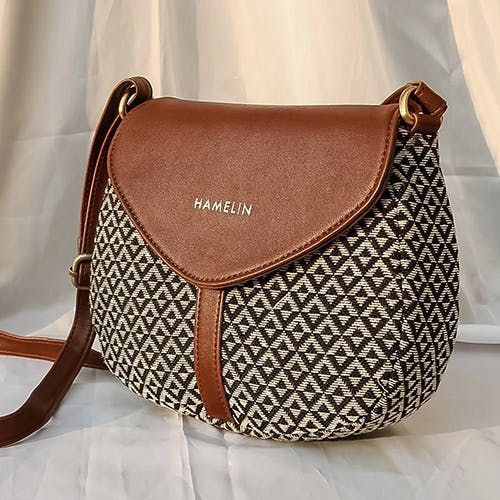
We all need at least one of what I like to refer to as a "grab-and-go" bags since they are cute, tiny, and very useful and because you don't have to worry as much about them when you cram them into a boot camp locker or bury them beneath the produce in your shopping cart.
<div class="flex flex-wrap gap-2">
  <div class="flex w-full sm:block tabs">
      <div class="mb-1 flex flex-col justify-center min-w-[8.125rem] tab-links">
          <button class="tab tab-boxed secondary-boxed tab-link" data-tabFilter="1"> About Us </button>
          <button class="tab tab-boxed secondary-boxed tab-active tab-link" data-tabFilter="2"> Contact Us </button>
          <button class="tab tab-boxed secondary-boxed tab-link" data-tabFilter="3"> Blog </button>
      </div>
      <div class="tabs-content">
          <div data-tabContent="1" class="tab-pan fade group relative  border-none !px-0 !pb-0">
              <p class="text-xs text-content3"> Creating a website that...</p>
          </div>
          <div data-tabContent="2" class="tab-pan fade active show  border-none !px-0 !pb-0">
              <p class="mb-1 text-xs text-content3"> Construct a web page...</p>
              <p class="font-bold text-title dark:text-dark"> Visit Us:
                  <span class="text-content3 text-2xs">4 Marigold Close, Glenmore Park, New South Wales, 2745 Australia- 2745</span>
              </p>
              <p class="font-bold text-title dark:text-dark">  Mail Us:
                  <span class="text-content3 text-2xs"> SamuelMario@armyspy.com</span>
              </p>
              <p class="font-bold text-title dark:text-dark"> Contact:
                  <span class="text-content3 text-2xs"> (02) 4733 6337</span>
              </p>
          </div>
          <div data-tabContent="3" class="tab-pan px-[0.9375rem] fade group relative  border-none !pt-2">
              <img src='../../assets/images/product/6.jpg' alt='bag' class="h-24 min-w-20">
              <p class="text-xs text-content3"> We all need at least...</p>
          </div>
      </div>
  </div>
</div>
Colored Tabs
Adding background with the help of .tabs-bordered-bg & .tabs-bordered class.
User Detail:
| # | Name | Country | Company Site | Contact No |
|---|---|---|---|---|
| 1 | Robert L. Andrews | New zealand | postitquiz.com | 5698741236 |
| 2 | Michelle T. Shepherd | Thailand | soundcrest.com | 7800030320 |
Description:
| Technology | Interest | Status | Salary Expected |
|---|---|---|---|
| Web Designer | HTML,CSS,JS,SCSS | in Progress | 45000 |
| UX Designer | Figma,Photoshop,craft | Success | 20000 |
Reviews:
| # | Name | Country | Company Site | Rating |
|---|---|---|---|---|
| 1 | Robert L. Andrews | India | liftcigs.com |
|
| 3 | Michelle T. Shepherd | New zealand | wodbig.com |
|
 <h3 class="mb-3 text-sm font-bold dark:text-white">User Detail:</h3>
 <div class="overflow-auto custom-scroll"></div>
   <table class="table equal-space">
     <thead>
       <tr>
         <th class="dark:text-content3">#</th>
         <th class="dark:text-content3">Name</th>
         <th class="dark:text-content3">Country</th>
         <th class="dark:text-content3">Company Site</th>
         <th class="dark:text-content3">Contact No</th>
       </tr>
     </thead>
     <tbody>
       <tr>
         <th class="dark:text-white rtl:text-right">1</th>
           <td class="dark:text-white"> Robert L. Andrews</td>
           <td class="dark:text-white"> liftcigs.com</td>
           <td class="dark:text-white">India </td>
           <td class="dark:text-white">5698741236 </td>
       </tr>
       <tr>
         <th class="dark:text-white rtl:text-right rtl:pt-4">2</th>
           <td class="dark:text-white">Michelle T. Shepherd</td>
           <td class="dark:text-white">soundcrest.com </td>
           <td class="dark:text-white">Thailand </td>
           <td class="dark:text-white">7800030320 </td>
       </tr>
     </tbody>
  </table>
  <h3 class="mb-3 text-sm font-bold dark:text-white">Description:</h3>
  <div class="overflow-auto custom-scroll">
    <table class="table equal-space">
      <thead>
        <tr>
            <th class="dark:text-content3">Technology </th>
            <th class="dark:text-content3">Interest </th>
            <th class="dark:text-content3">Status </th>
            <th class="dark:text-content3">Salary Expected </th>
        </tr>
      </thead>
      <tbody>
        <tr>
              <td class="dark:text-white ">Web Designer</td>
              <td class="dark:text-white">HTML,CSS,JS,SCSS</td>
            <th class="dark:text-warning text-warning">in Progress </th>
              <td class="dark:text-white">45000</td>
        </tr>
        <tr>
            <td class="dark:text-white">UX Designer</td>
            <td class="dark:text-white">Figma,Photoshop,craft</td>
            <td class="dark:text-success text-success">Success</td>
            <td class="dark:text-white">20000</td>
        </tr>
      </tbody>
    </table>
  </div>
  <h3 class="mb-3 text-sm font-bold dark:text-white">Reviews:</h3>
  <div class="overflow-auto custom-scroll">
  <table class="table equal-space">
    <thead>
        <tr>
            <th class="dark:text-content3">#</th>
            <th class="dark:text-content3">Name</th>
            <th class="dark:text-content3">Country</th>
            <th class="dark:text-content3">	Company Site</th>
            <th class="dark:text-content3 rtl:!text-end">Rating </th>
        </tr>
    </thead>
    <tbody>
      <tr>
        <th class="dark:text-white rtl:text-right">1</th>
            <td class="dark:text-white">Robert L. Andrews</td>
            <td class="dark:text-white"> New zealand </td>
            <td class="dark:text-white"> postitquiz.com </td>
            <td class="dark:text-white">
            <div class="flex items-center justify-end gap-[2px]">
              <i class="fa-solid fa-star text-warning"> </i>
              <i class="fa-solid fa-star text-warning"></i>
              <i class="fa-solid fa-star text-warning"></i>
              <i class="fa-solid fa-star text-warning"></i>
            </div>
           </td>
        </tr>
      <tr>
      <th class="dark:text-white rtl:text-right rtl:pt-4">3</th>
        <td class="dark:text-white"> Michelle T. Shepherd  </td>
        <td class="dark:text-white">New zealand </td>
        <td class="dark:text-white">wodbig.com </td>
          <td>
            <div class="flex items-center justify-end gap-[2px]">
              <i class="fa-solid fa-star text-warning"></i>
              <i class="fa-solid fa-star text-warning"></i>
              <i class="fa-solid fa-star text-warning"></i>
            </div>
          </td>
        </tr>
      </tbody>
  </table>
Tabs with Icons
Adding icons inside the tabs with the help of .tabs class.
Not constrained by geographical borders or states. Providing cutting-edge design and website development services for more than 12 years all over India. We offer full-service digital solutions, starting with developing your website or application and ending with timely and efficient renewal of services for domain, web hosting, email hosting, and other internet marketing.

<div class="flex flex-wrap gap-2">
  <div class="flex-col w-full tabs">
      <div class="flex mb-1 tab-links">
          <button class="tab tabs-bordered tabs-bordered-bg secondary-bg tab-active tab-link" data-tabFilter="1">
              +SVG_ICON("Home","w-[1.125rem] h-[1.125rem] stroke-title") Profile </button>
          <button class="tab tabs-bordered tabs-bordered-bg secondary-bg tab-link" data-tabFilter="2">
              +SVG_ICON("2-User","w-[1.125rem] h-[1.125rem] stroke-title") Profile </button>
          <button class="tab tabs-bordered tabs-bordered-bg secondary-bg tab-link" data-tabFilter="3">
              +SVG_ICON("Document","w-[1.125rem] h-[1.125rem] stroke-title") Contact </button>
      </div>
      <div class="tabs-content">
          <div data-tabContent="1" class="tab-pan fade active show  border-none !px-0 !pb-0">
              <p class="text-xs text-content3"> Tabs are used ...attractive.</p>
          </div>
          <div data-tabContent="2" class="tab-pan fade group relative  border-none !px-0 !pb-0">
              <p class="text-xs text-content3"> We use tabs to ...attractive.</p>
          </div>
          <div data-tabContent="3" class="tab-pan fade group relative  border-none !px-0 !pb-0">
              <div class="flex flex-col gap-3 form-group">
                  <div class="flex flex-col gap-1">
                      <label for="email" class="text-xs font-medium text-primary ">Email</label>
                      <input type="email"  placeholder="Enter your email id.." class="p-[11px] w-full border border-border-light rounded-5 text-xs text-content dark:bg-sidebar-dark2 dark:border-border-dark "/>
                  </div>
                  <div class="flex flex-col gap-1">
                      <label for="password" class="text-xs font-medium text-primary">Password</label>
                      <input type="password" id="password"  placeholder="Password.." class="p-[11px] w-full border border-border-light rounded-5 text-xs text-content dark:bg-sidebar-dark2 dark:border-border-dark "/>
                  </div>
              </div>
          </div>
      </div>
  </div>
</div>